Help Getting started

Plan a term and open it for booking

A group is the cohort, a term is its dated run of sessions, and opening the term puts it on your booking page

Set up a group once (Tuesday Toadstools, Year 3, the Thursday home-ed crew) and give it a term: the dates, the site, the times, the price. The app lays down every session with its register, its plan and its risk assessments ready, and one click puts the term on your booking page for families to buy whole or drop into. Skip half term with a tick. Next term takes two minutes, because the group remembers everything.

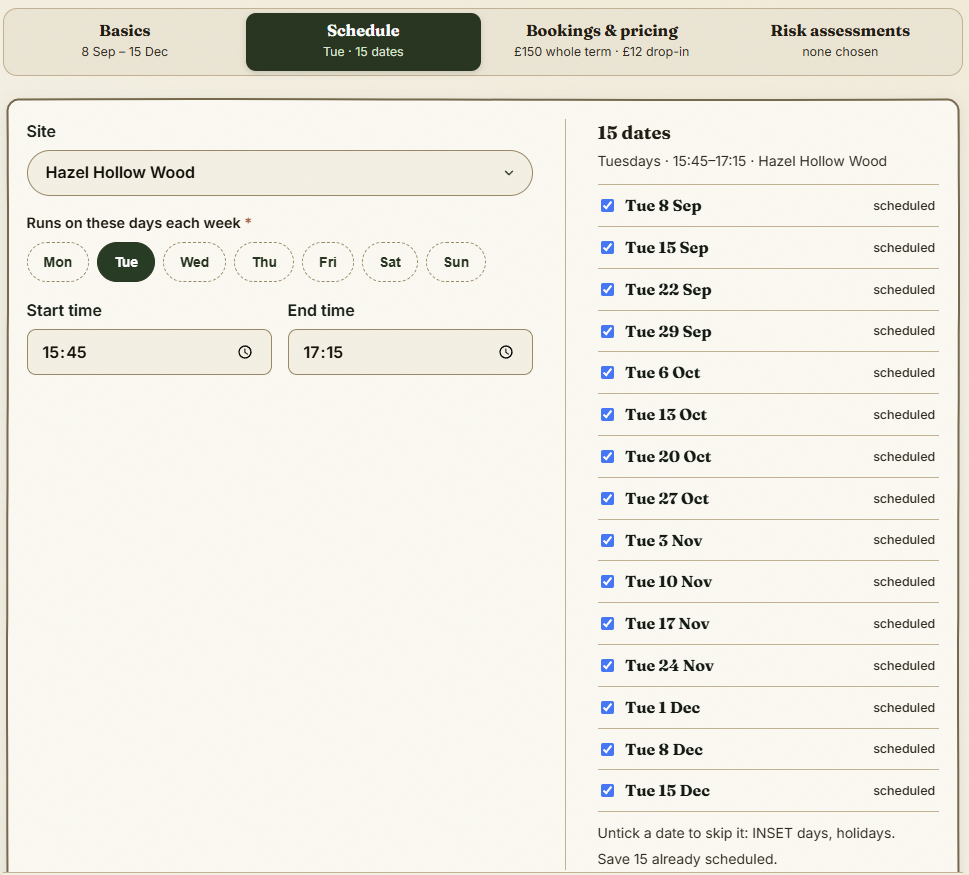
A term's schedule: the days, the times and the dates it builds

The step-by-step guide is in the app

To use this in your own forest school, create a free account. The full walkthrough, with every screen, is waiting inside.

This is how it works in the Forest School app. Start free, or see all help articles.

An unhandled error has occurred. Reload 🗙

Rejoining the server...

Rejoin failed... trying again in seconds.

Failed to rejoin.
Please retry or reload the page.

The session has been paused by the server.

Failed to resume the session.
Please retry or reload the page.