Help Bookings

Terms and conditions people agree to when they book

Upload your terms, link them, or write them in, and nobody can book without agreeing and signing

Your terms and conditions in front of everyone before they can book. Upload the PDF you already have, paste a link to your website, or write them in the app, and the person booking ticks and types their name to sign. The exact terms they saw are kept on their booking, so if you change them next year you can still show what was agreed.
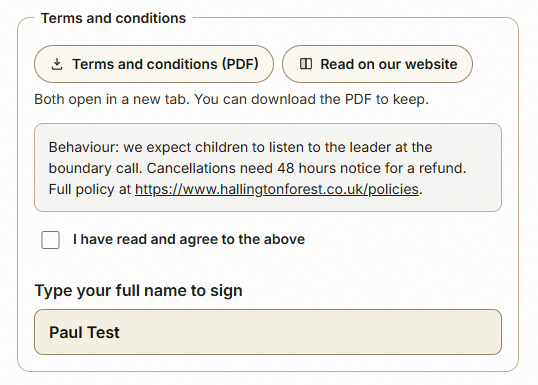
What the person booking sees: the terms, the tick and the signature

The step-by-step guide is in the app

To use this in your own forest school, create a free account. The full walkthrough, with every screen, is waiting inside.

This is how it works in the Forest School app. Start free, or see all help articles.

An unhandled error has occurred. Reload 🗙

Rejoining the server...

Rejoin failed... trying again in seconds.

Failed to rejoin.
Please retry or reload the page.

The session has been paused by the server.

Failed to resume the session.
Please retry or reload the page.