Help Settings

Plan templates

Write a session plan once, name it, and drop it onto any session from the plan editor

Most forest schools run the same session more than once: den building for the Tuesday group and again for the Thursday group, fire lighting week one for every new cohort, the winter shelter build each December. A plan template is that plan written once, with its aims, its activities and the kit to bring, kept under Settings with a name. On any session, the plan editor offers Use a plan template, and the plan fills in. Change what is different about this date, save, and the session has its own copy, so tidying the template later never rewrites a session you have already run. It works the other way too: a plan you have just written becomes a template with Save as template and a name.
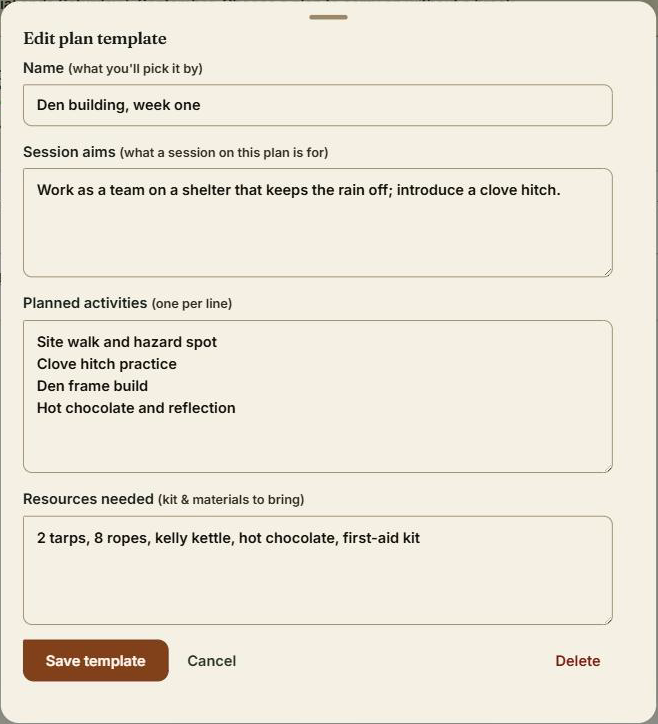
The plan templates table under Settings, with one template open

The step-by-step guide is in the app

To use this in your own forest school, create a free account. The full walkthrough, with every screen, is waiting inside.

This is how it works in the Forest School app. Start free, or see all help articles.

An unhandled error has occurred. Reload 🗙

Rejoining the server...

Rejoin failed... trying again in seconds.

Failed to rejoin.
Please retry or reload the page.

The session has been paused by the server.

Failed to resume the session.
Please retry or reload the page.